
问答模块
api 接口
以下 ID、分享码及响应字段为结构示例,应替换为本次接口返回的数据;Java 接口的资源 ID 使用十进制长整型字符串。管理账号令牌与分享访客令牌分开保存。
打开问答页面例如http://127.0.0.1:3000/ui/#/chat/abe8055668fb480f会发送下面的请求和得到下面的响应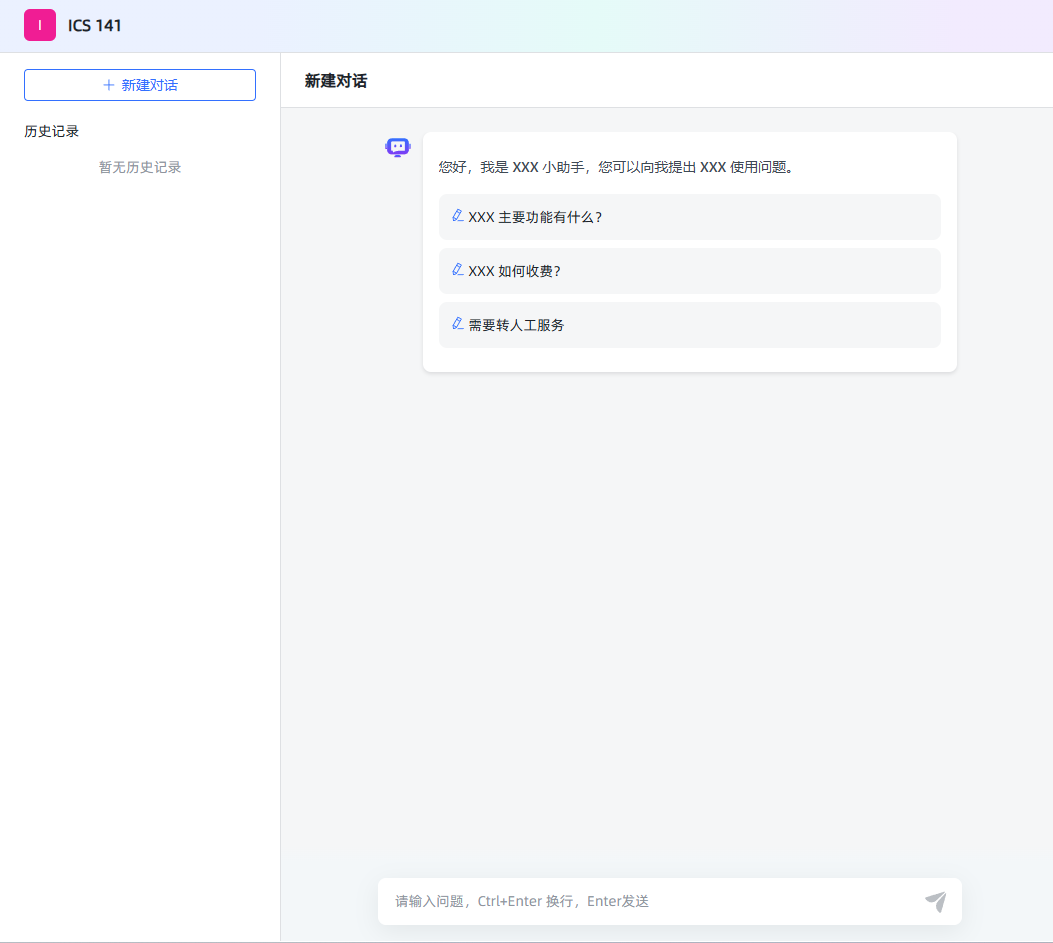
profile
GET /api/profile
{
  "code": 200,
  "message": "成功",
  "data": {
    "version": "v1.7.0 (build at 2024-10-31T12:49, commit: 44b3aed5)",
    "IS_XPACK": false,
    "XPACK_LICENSE_IS_VALID": false
  }
}authentication
- 1.验证前端传递的 短 token 是否合法,
- 2.如果合法创建长 token 并返回,创建 client
- 3.如果浏览器传递时是长 token,解析长 token,判断用户是否存在,如果不存在,重复步骤 2,如果存在直接返回长 token
POST /api/application/authentication
header
Authorization: Bearer <CHAT_TOKEN>post
{ "access_token": "abe8055668fb480f" }{
"code": 200,
"message": "成功",
"data": "<CHAT_TOKEN>"
}1.浏览器在 local storage 中存储的 accessToken 用户 chat 页面聊天 2.浏览器在 local storage 中存储的 token 后台管理页面
application/profile
验证通过后 调用 application/profile 获取应用的信息
- 1.从请求中获取 token,解析 token 中的 id (拦截器会自动进行)
- 2.查询表获取应用 id
- 3.返回应用信息
GET /api/application/profile authorization:
{
  "code": 200,
  "message": "成功",
  "data": {
    "id": "695640157413023744",
    "name": "ICS 141",
    "desc": "ics 141 课程助手",
    "prologue": "您好,我是 XXX 小助手,您可以向我提出 XXX 使用问题。\n- XXX 主要功能有什么?\n- XXX 如何收费?\n- 需要转人工服务",
    "dialogue_number": 1,
    "icon": "/ui/favicon.ico",
    "type": "SIMPLE",
    "stt_model_id": null,
    "tts_model_id": null,
    "stt_model_enable": false,
    "tts_model_enable": false,
    "tts_type": "BROWSER",
    "work_flow": {},
    "show_source": false,
    "multiple_rounds_dialogue": true
  }
}GET /api/application/695640157413023744/chat/client/1/20
{
  "code": 200,
  "message": "成功",
  "data": {
    "total": 0,
    "records": [],
    "current": 1,
    "size": 20
  }
}开启会话
客户端调用 GET /api/application/{application_id}/chat/open 接口时,服务端为此次会话生成了一个新的会话标识(这里返回的是 chat_id,如 "695665746105634816")。此时,虽然主要返回的是会话 ID,但服务端内部可能已经初始化了与该会话关联的各类信息,包括生成一个唯一的客户端标识。
get /api/application/695640157413023744/chat/open
{
  "code": 200,
  "message": "成功",
  "data": "695665746105634816"
}问答
POST /api/application/chat_message/695665746105634816
{"message":"when is the office hours","re_chat":false,"form_data":{}}response event response 和项目的相同
get /api/application/695640157413023744/chat/client/1/20
{
  "code": 200,
  "message": "成功",
  "data": {
    "total": 1,
    "records": [
      {
        "id": "695665746105634816",
        "application_id": "695640157413023744",
        "abstract": "when is the office hours",
        "client_id": "695640157413023745"
      }
    ],
    "current": 1,
    "size": 20
  }
}开发接口
InterceptorConfiguration
当前配置放行登录、公开配置和分享认证入口;聊天消息接口仍经鉴权和会话归属检查。
package nexus.io.mosskb.config;

import nexus.io.mosskb.inteceptor.MossKbAuthInterceptor;
import nexus.io.tio.boot.admin.consts.TioBootAdminUrls;
import nexus.io.tio.boot.http.interceptor.HttpInteceptorConfigure;
import nexus.io.tio.boot.http.interceptor.HttpInterceptorModel;
import nexus.io.tio.boot.server.TioBootServer;

public class MossKbInterceptorConfiguration {

  public void config() {
    MossKbAuthInterceptor authTokenInterceptor = new MossKbAuthInterceptor();
    HttpInterceptorModel model = new HttpInterceptorModel();
    model.setInterceptor(authTokenInterceptor);

    model.addBlockUrl("/**");

    model.addAllowUrls(TioBootAdminUrls.ALLLOW_URLS);
    model.addAllowUrls("", "/");
    model.addAllowUrls("/ui/**");
    model.addAllowUrls("/sse", "/api/user/login");

    model.addAllowUrls("/api/profile", "/api/application/authentication");

    model.addAllowUrls("/api/v1/search", "/api/display/info", "/api/auth/types", "/api/qr_type");
    //
    HttpInteceptorConfigure configure = new HttpInteceptorConfigure();
    configure.add(model);

    TioBootServer.me().setHttpInteceptorConfigure(configure);
  }
}多轮问答、历史读取与 token 压缩
一次提问可以触发多个检索轮次:读取当前会话历史 → 改写独立问题 → 检索 → 判断资料是否足够 → 按缺口补充检索 → 最终回答。默认最多 3 轮,配置范围最多 6 轮;充分、无新增证据或达到上限时停止,缺失事实不编造。
会话历史从数据库读取,隔离到当前应用及会话。只有历史 token 超过预算才压缩;轮数超出保留目标不会单独触发摘要。压缩后保留近期原文及持久摘要,摘要生成失败时不推进压缩水位。
最终回答使用应用选择的数据库模型,通过 UniChatClient.streamOpenAi 返回 SSE。问题改写、证据核验和摘要使用配置的 Gitee 辅助模型。页面展示检索进度,只有实际超阈值压缩时展示 Compacting context。
完整参数、历史读取与压缩接口见上下文压缩,取消与隔离 Python 执行见隔离 Python 执行环境配置和隔离 Python 执行器。模型配置见支持自定义模型。
消息控制器实现
package nexus.io.mosskb.controller;

import nexus.io.annotation.Post;
import nexus.io.annotation.RequestPath;
import nexus.io.jfinal.aop.Aop;
import nexus.io.mosskb.service.kb.MossKbApplicationChatMessageService;
import nexus.io.mosskb.vo.MossKbChatRequestVo;
import nexus.io.model.result.ResultVo;
import nexus.io.tio.boot.http.TioRequestContext;
import nexus.io.tio.core.Tio;
import nexus.io.tio.http.common.HeaderName;
import nexus.io.tio.http.common.HeaderValue;
import nexus.io.tio.http.common.HttpRequest;
import nexus.io.tio.http.common.HttpResponse;
import nexus.io.tio.http.server.util.CORSUtils;
import nexus.io.tio.server.ServerChannelContext;
import nexus.io.tio.utils.json.JsonUtils;

@RequestPath("/api/application/chat_message")
public class ApiApplicationChatMessageController {

  @Post("/{chatId}")
  public HttpResponse ask(Long chatId, HttpRequest request, ServerChannelContext channelContext) {
    String bodyString = request.getBodyString();
    MossKbChatRequestVo mossKbChatRequestVo = JsonUtils.parse(bodyString, MossKbChatRequestVo.class);
    HttpResponse httpResponse = TioRequestContext.getResponse();
    CORSUtils.enableCORS(httpResponse);
    // 设置sse请求头
    httpResponse.addServerSentEventsHeader();
    // 设置响应头
    httpResponse.addHeader(HeaderName.Transfer_Encoding, HeaderValue.from("chunked"));
    httpResponse.addHeader(HeaderName.Keep_Alive, HeaderValue.from("timeout=60"));
    // 手动发送消息到客户端,因为已经设置了sse的请求头,所以客户端的连接不会关闭
    Tio.bSend(channelContext, httpResponse);
    httpResponse.setSend(false);
    try {
      ResultVo result = Aop.get(MossKbApplicationChatMessageService.class).ask(channelContext, chatId, mossKbChatRequestVo);
      if (result.getCode() != 200) {
        nexus.io.tio.http.server.util.SseEmitter.pushSSEChunk(channelContext, "error", JsonUtils.toJson(result));
        nexus.io.tio.http.server.util.SseEmitter.closeChunkConnection(channelContext);
      }
    } catch (Exception e) {
      nexus.io.tio.http.server.util.SseEmitter.pushSSEChunk(channelContext, "error", JsonUtils.toJson(ResultVo.fail(e.getMessage())));
      nexus.io.tio.http.server.util.SseEmitter.closeChunkConnection(channelContext);
    }
    return httpResponse;
  }
}历史和压缩接口、SSE 过程事件的完整结构见第 32 章。不要将原文“response event 与项目相同”理解为省略协议处理:客户端需要处理流式内容、进度和失败事件。